
Your homepage is the busiest door into your business. Visitors arrive from Google, social media, ads, and referrals, and within seconds they decide whether to stay or leave. Strong homepage design turns that short window into a conversation. It tells people who you are, what you offer, and what to do next, without forcing them to hunt for answers.
Yet many business websites still treat the front page like a digital brochure: a rotating slider, a vague slogan, and three paragraphs of company history. Effective homepage design works differently. It is a focused, strategic page that serves visitors, supports search visibility, and guides the right people toward a call, a form, or a purchase.
In this guide, you will learn what every business website needs on its front page, from the headline and navigation to trust signals, speed, mobile layout, and technical SEO. Whether you are launching a new site or fixing an underperforming one, use it as a practical blueprint for better homepage design.
What Is Homepage Design and Why Does It Matter?
Homepage design is the process of planning the structure, content, visuals, and functionality of your website’s main landing page. It covers the words in your headline, the order of your sections, the colors and fonts you choose, and the way the page behaves on a phone. Good homepage design is not about decoration. It is about clarity.
Think of your homepage as a reception desk. A visitor walks in and wants three things quickly: confirmation that they are in the right place, proof that you can be trusted, and an easy next step. If the desk is cluttered or confusing, they leave.
The stakes are high for several reasons:
- First impressions form fast. Visitors judge credibility within seconds, mostly from layout, clarity, and visual polish.
- The homepage carries authority. Brand searches and backlinks often point to it, so it usually holds more ranking potential than any other page.
- It routes traffic. The front page sends people to service pages, blog posts, and your contact form.
- It shapes brand perception. Typography, imagery, and tone tell visitors whether you are a premium provider or a bargain option.
Because of all this, homepage design deserves more attention than almost any other page on your site.
Why Homepage Design Matters for SEO
Many owners treat design and SEO as separate jobs. In reality, homepage design and search optimization are tightly connected. Google wants to show pages that satisfy users, and a confusing front page sends people straight back to the results.
Search engines also use your homepage to understand what your entire website is about. If you are new to this, our guide on how Google search works explains crawling, indexing, and ranking in plain language, and what is SEO covers the fundamentals.
A search-friendly homepage design usually includes:
- A clear H1 that names your core service and, for local businesses, your location
- Descriptive internal links to your most important service pages
- Fast loading times and a mobile-friendly layout
- Clean metadata and structured data
- Natural, readable copy built around real customer search phrases
That last point starts with proper keyword research. Before you write a headline, learn which phrases your customers actually type, then reflect them in your headings and body copy. After that, run through an on-page SEO checklist to make sure titles, headings, images, and links work together. Just avoid stuffing. Great homepage design balances human reading with search signals, and readers always come first.
Above the Fold: Win the First Five Seconds
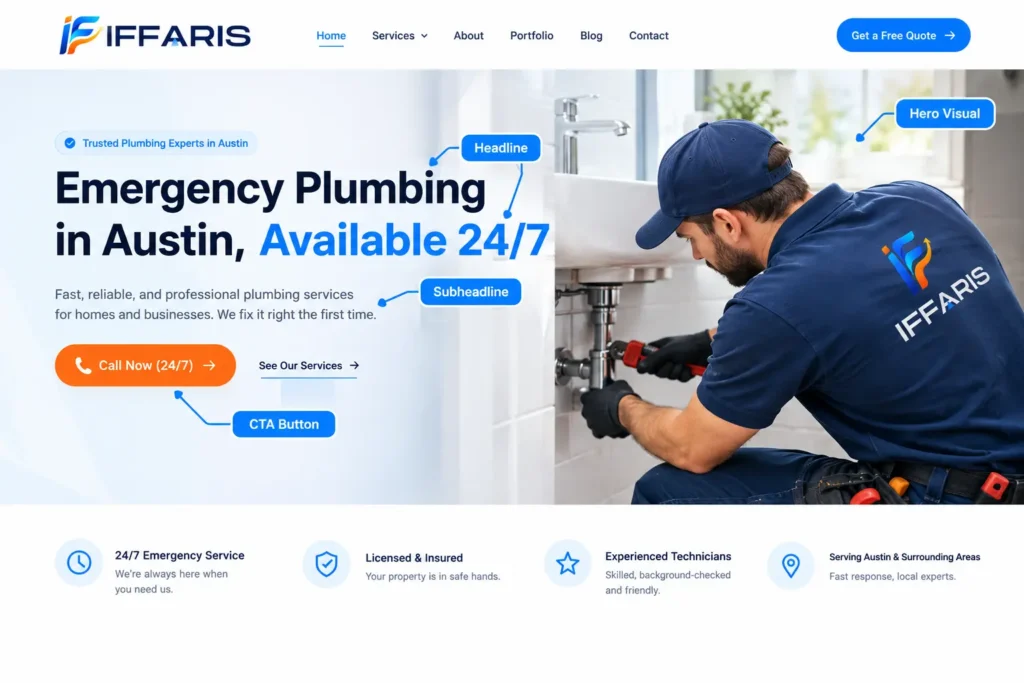
The section visible before anyone scrolls is the most valuable space you own. In homepage design, this is where most visitors decide whether to stay. Four elements belong here.
A Clear, Specific Headline
Your headline should answer one question: what do you do, and for whom? “We deliver excellence” says nothing. “Emergency plumbing in Austin, available 24/7” says everything. Specific headlines improve conversions and give search engines a strong topical signal. Keep it under twelve words when possible and avoid jargon.
A Supporting Subheadline
Use one or two sentences to add detail: your main benefit, your differentiator, or the problem you solve. The subheadline is a natural place to include a secondary keyword, such as a service name or city.
One Primary Call to Action
Every strong homepage design has a single dominant action above the fold: Call Now, Get a Free Quote, Book a Demo, or Shop Best Sellers. Use a contrasting button color, action-oriented text, and generous white space. A secondary link such as “See our services” is fine, but two equally loud buttons create hesitation.
A Relevant Hero Visual
Use a real photo of your team, your work, or your product rather than a generic stock image. Authentic imagery builds trust faster. Compress it properly, because a heavy hero image is one of the most common causes of slow loading.
Navigation That Helps Visitors Find Things
Navigation is the map of your site, and effective homepage design keeps that map simple. Aim for five to seven top-level menu items. Typical choices include Services, About, Portfolio or Case Studies, Blog, and Contact.
Follow these best practices:
- Use plain language. “Services” beats “Our Solutions Universe.”
- Keep the menu consistent across every page.
- Show your phone number or main button in the header.
- Add a footer menu with secondary links such as privacy policy, terms, and service areas.
Navigation also affects crawlability. Menu links are internal links, and search engines follow them to discover pages. A tidy structure supports the architecture described in our technical SEO checklist, so keep important pages within one or two clicks of the front page.
Trust Signals Every Business Homepage Needs
Visitors who do not know you need reassurance before they commit. Placing proof directly on the front page is one of the highest-impact choices in homepage design.
Reviews and Testimonials
Display two or three genuine testimonials with a name, photo, and location where possible. Show your Google star rating if it is strong. If you need more social proof, read our guide on how to get more Google reviews. Reviews on your page also reinforce what customers say about you in search results.
Logos, Certifications, and Awards
Client logos, industry memberships, licenses, insurance badges, and awards signal legitimacy. Keep them small and tidy. A single row works well.
Case Studies and Results
Numbers beat adjectives. “Increased leads by 62% in four months” is more convincing than “great results.” Link to full case studies from a short summary block.
Security and Policies
Use HTTPS, display clear contact details, and link to privacy and refund policies. Security affects conversions and rankings alike. For ongoing protection, this guide to website security is a useful reference.
Showcase Your Services or Products Clearly
After the hero section, visitors want to see what you sell. Present three to six core services or product categories as cards, each with an icon or image, a short description, and a link to a dedicated page. This layout helps people self-select and passes internal link equity to your deeper pages.
A common mistake in homepage design is cramming every service onto the front page. Instead, feature your highest-value offers and let service pages carry the detail. For help structuring those deeper pages, read this guide to service pages SEO.
If you run a local business, mention your service areas in this section too. Our local SEO guide shows how location signals support rankings.
Build a Logical Content Hierarchy
A great homepage tells a story from top to bottom. A proven order looks like this:
- Hero section with headline, subheadline, and call to action
- Short introduction or value proposition
- Services or product highlights
- Social proof: reviews, logos, and case studies
- “Why choose us” section with clear differentiators
- Process or how-it-works overview
- Latest blog posts or resources
- Final call to action
- Footer with contact details, links, and legal pages
This sequence mirrors the way people decide: understand, trust, then act. Within homepage design, resist the urge to add a section just because competitors have one. Each block should earn its place by answering a question a visitor is likely to ask.
Use clear H2 headings for each section, with H3s only where needed. A proper heading structure improves accessibility and helps search engines interpret your page.
Visual Design: Clean, Consistent, and On Brand
Visual choices should support readability, not compete with it. Keep these principles in mind:
- Whitespace: Space around elements guides the eye and reduces overwhelm.
- Typography: Use no more than two typefaces, with body text at 16px or larger.
- Color: Choose a primary brand color, a neutral palette, and one accent color for buttons.
- Contrast: Text must be easy to read against its background.
- Consistency: Buttons, icons, and image styles should look like they belong together.
- Imagery: Prefer original photos, illustrations, or short videos over generic stock.
Skip auto-playing carousels. They rarely earn clicks past the first slide, they hurt performance, and they frustrate users. A single strong message beats five competing ones. The best homepage design feels calm and confident.
Mobile-First Homepage Design
Most web traffic now comes from phones, and Google primarily uses the mobile version of a page for indexing. That makes mobile-first homepage design a requirement, not a bonus.
Check these items on a real device:
- Text is readable without zooming
- Buttons and links are large enough to tap, with space between them
- A tap-to-call button is visible for service businesses
- The menu opens and closes smoothly
- There is no horizontal scrolling
- Forms trigger the right keyboard for phone and email fields
- Images scale instead of overflowing
Design the mobile layout first, then expand it for tablet and desktop. This forces you to prioritize what matters most. WordPress makes responsive layouts easier, and our WordPress website setup guide walks through the basics. For a look at how structure, themes, and plugins shape the result, see this overview of WordPress website design.
Speed and Core Web Vitals
A beautiful page that loads slowly loses visitors before they see it. Speed is part of homepage design, not a separate technical project. Google’s Core Web Vitals measure loading (LCP), interactivity (INP), and visual stability (CLS), and all three are influenced by design decisions such as hero image size, font loading, animation, and third-party scripts.
Quick wins include:
- Compress images and use modern formats like WebP
- Lazy-load images below the fold
- Limit custom fonts and font weights
- Remove unused plugins and scripts
- Use caching and a content delivery network
- Avoid heavy sliders and background videos
Test regularly with a website speed test and compare results over time. If you run WordPress, our tips for WordPress website speed and choosing the right WordPress plugins will help you trim bloat. For a deeper explanation of the metrics, see this overview of Core Web Vitals and this checklist on how to improve website speed.
Homepage Design for Local Businesses
If you serve a specific city or region, your front page needs extra elements. Strong local homepage design reinforces who you are and where you work.
- NAP details: Your business name, address, and phone number should appear in the header or footer and match your other listings exactly. This guide to NAP consistency explains why it matters.
- Embedded map: A map helps visitors find you and reinforces your location.
- Service areas: List the towns or neighborhoods you cover.
- Google Business Profile link: Connect your site and your listing. See our guide to Google Business Profile optimization.
- Local schema markup: Structured data helps search engines understand your business. This local business schema guide shows how.
- Local citations: Consistent directory listings strengthen trust. Learn more about local citations.
A well-optimized local homepage design also uses a title tag that combines your service and city. This explanation of local SEO title tags covers the formula in detail.
Calls to Action and Conversion Elements
Traffic only matters when it converts. Every homepage design should map out the actions you want visitors to take and make each one easy.
- Repeat your main call to action after major sections, not just at the top.
- Write specific button text. “Get My Free Quote” outperforms “Submit.”
- Keep forms short. Name, email, and one question is often enough.
- Add reassurance near buttons, such as “No obligation” or “We reply within one hour.”
- Offer a low-commitment option, like a free guide, for visitors who are not ready to buy.
Use heatmaps and session recordings to see where visitors click and where they stall. Small changes, like moving a button or shortening a form, can produce large gains.
Accessibility: Design for Everyone
Accessible pages widen your audience and overlap heavily with good SEO. When you plan homepage design, include these basics:
- Alt text on meaningful images
- Sufficient color contrast
- Keyboard-friendly navigation with visible focus states
- Descriptive link text instead of “click here”
- Logical heading order
- Captions or transcripts for video
- Properly labeled form fields
The Web Content Accessibility Guidelines (WCAG) are a solid starting point for any team.
Technical SEO Elements Behind the Scenes
Some of the most important parts of homepage design are invisible. Check that you have:
- A unique, compelling title tag and meta description
- A single H1
- A canonical tag pointing to the preferred URL
- Open Graph tags for social sharing
- Organization or LocalBusiness schema
- A submitted XML sitemap and a correct robots.txt file (see our robots.txt SEO guide)
- Internal links with descriptive anchor text
- Monitoring in Search Console (see how to use Google Search Console)
If your site runs on WordPress, our WordPress SEO guide helps you cover these items without writing code.
Common Homepage Design Mistakes to Avoid
Even experienced teams repeat the same errors. Watch for these:
- Vague messaging. If visitors cannot tell what you do in five seconds, rewrite the headline.
- Too many choices. Ten buttons and six menus produce no action.
- Autoplay sliders and videos. They are slow, distracting, and often ignored.
- Stock-photo overload. Generic images erode trust.
- Hidden contact details. Make your phone number and form easy to find.
- Ignoring mobile. A desktop-only approach to homepage design is out of date.
- Thin or duplicated content. Pages with little unique text struggle to rank.
- Slow loading. Heavy assets drive visitors away.
- No tracking. Without data, you cannot improve.
Many of these overlap with the problems covered in this list of common SEO mistakes.
Homepage Design Trends Worth Considering in 2026
Trends come and go, but a few are worth adopting because they improve usability rather than just looks. Modern homepage design is moving toward simplicity, personalization, and speed.
Minimal, content-first layouts. Visitors are tired of clutter. Fewer elements, larger type, and more white space make homepage design easier to scan on small screens and faster to load.
Short video and motion with restraint. A brief, muted loop can explain a product quickly, but only if it is lightweight and does not block the main message. Use motion to guide attention, not to show off.
Personalized content blocks. Some businesses now adjust homepage design based on location, returning visits, or traffic source. Even simple tweaks, like showing a city name or a relevant offer, can lift engagement.
AI-assisted drafting and testing. AI tools can speed up wireframes, copy variations, and layout experiments. Use them as a starting point, then edit carefully so the final page reflects your real voice and expertise. Our overview of AI and SEO explains how search is changing alongside these tools.
Trust-first design. Real faces, verified reviews, transparent pricing, and clear policies are becoming standard. Strong homepage design earns confidence early rather than asking visitors to take your word for it.
Whatever you adopt, test it against your own data. A trend that works for a large retailer may not suit a local contractor, and good homepage design always starts with your audience, not a design gallery.
Website Builder, WordPress, or Custom: Which Fits Your Homepage?
The platform you choose shapes your options, though the principles stay the same.
- Website builders: Fast and affordable, but limited in flexibility. Read our AI website builders guide or this explanation of how a website builder works.
- WordPress: Flexible, scalable, and strong for SEO control. This comparison of an AI website builder vs WordPress helps you weigh the trade-offs.
- Custom development: Maximum control, but a higher cost and longer timeline.
Whichever route you take, homepage design still comes down to a clear message, visible trust, fast performance, and an obvious path to action.
A Step-by-Step Process to Plan Your Homepage
- Define your goal. Decide on the one action that matters most, such as calls, bookings, or sales.
- Know your audience. List their questions, objections, and the words they use.
- Research keywords. Pick one primary phrase and a few supporting terms.
- Write the copy first. Great homepage design starts with words, not templates.
- Sketch a wireframe. Arrange sections in the hierarchy described earlier.
- Design and build. Apply your brand colors, fonts, and imagery consistently.
- Test everything. Check speed, mobile layout, links, forms, and accessibility.
- Launch and monitor. Track traffic, clicks, and conversions from day one.
- Iterate. Improve one element at a time based on real data.
Homepage Design Checklist
Use this list before you publish:
- Headline clearly states what you do and for whom
- One primary call to action above the fold
- Navigation limited to five to seven items
- Reviews, logos, or case studies visible
- Services linked to dedicated pages
- Phone number and contact form easy to find
- Mobile layout tested on a real device
- Images compressed and lazy-loaded
- Title tag, meta description, and H1 optimized
- Schema markup added
- Accessibility basics covered
- Analytics and Search Console connected
How to Measure Homepage Success
You cannot improve what you do not measure. Track these metrics monthly:
- Engagement rate and scroll depth: Do visitors read beyond the first screen?
- Click-through rate on buttons: Are your calls to action working?
- Conversion rate: How many visitors become leads or customers?
- Organic impressions and clicks: Check these in Search Console.
- Core Web Vitals: Watch for regressions after updates.
- Branded searches: Rising numbers signal growing awareness.
When you adjust homepage design, change one element at a time and compare results. A/B testing headlines, button text, and hero images is one of the fastest ways to learn what your audience prefers. For help with the traffic side of the equation, see this practical SEO strategy guide.
How Homepage Design Changes by Business Type
The core principles apply everywhere, but emphasis shifts depending on what you sell.
Local service businesses should lead with a phone number, service area, and reviews. Speed to contact matters most.
Ecommerce stores need featured categories, best sellers, promotions, and visible shipping and return information.
B2B and SaaS companies should highlight outcomes, integrations, customer logos, and a demo request.
Professional services such as law, finance, and consulting benefit from credentials, case studies, and a calm, authoritative tone.
In every case, homepage design should reflect how your buyers actually make decisions.
Frequently Asked Questions About Homepage Design
How long should a homepage be?
There is no fixed length. Long enough to answer a visitor’s main questions, short enough to stay focused. Most business pages land between 800 and 1,500 words, supported by clear sections and visuals.
How often should I update my homepage?
Review it every quarter. Refresh offers, testimonials, and featured content, and revisit your homepage design annually or after any major business change.
Does homepage design affect rankings?
Yes, indirectly. Layout, speed, mobile usability, and clarity affect engagement and crawlability, which influence how well your pages perform in search.
How much does professional homepage design cost?
Costs vary widely. A template-based build may cost a few hundred dollars, while custom homepage design from an agency can run into the thousands. Your goals, content needs, and platform all play a role.
What is the single most important element?
Your headline and call to action. If visitors do not understand your offer and next step, nothing else on the page can compensate.
Final Thoughts
Your homepage is your digital storefront, your sales pitch, and your SEO anchor in one place. The best homepage design is clear, fast, trustworthy, and built around a single goal. Start with a specific headline, support it with proof, make navigation effortless, and optimize behind the scenes so search engines understand your offer.
Treat homepage design as an ongoing process rather than a one-time project. Test, measure, and refine as your business and customers evolve. Do that consistently, and your front page will work harder than any other asset you own.
If you want to go deeper, explore more practical tutorials on the IFFARIS and start applying these homepage design principles today.